A compromised WordPress website does more than create technical disruption. It can interrupt lead generation, damage trust, expose visitors to malicious behavior, and force the business into a high-pressure recovery decision.
In this article, we explain how to secure a WordPress website from hackers by strengthening the controls that prevent compromise, spotting fake verification attacks early, and making faster, cleaner recovery decisions when an incident is already underway.
Executive Summary:
1. A fake Cloudflare-style verification page is a live security incident. If a trusted website starts showing attacker-controlled prompts or off-domain redirects, visitor exposure is already underway.
2. Real WordPress compromises usually reflect preventable operating weakness. Unsupported runtimes, weak plugin governance, loose privileged access, and untested recovery paths create the conditions attackers exploit.
3. The strongest prevention model is practical, not performative. Supported PHP, controlled plugins and themes, a WAF, file-change monitoring, tested backups, and disciplined admin review reduce the failures that lead to compromise.
4. Some WordPress sites should not be cleaned in place. If the team cannot bound file drift, rule out persistence, or trust its restore points, rebuild is often the safer business choice.
5. Regional complexity raises response pressure. For organizations operating across APAC, including Singapore and China, fragmented ownership across hosting, approvals, and support can slow containment and relaunch.
Table of Contents
- A Fake Cloudflare Verification Prompt Is a Security Warning, Not a WordPress Website Glitch
- What a Real Incident Revealed About WordPress Risk
- How to Spot a Fake Verification Attack on WordPress
- How to Secure a WordPress Website From Hackers in Practice
- 1. Keep the Runtime and Component Stack Fully Supported
- 2. Put a WAF and Edge Controls in front of the Site
- 3. Reduce Privileged Access and Review It on a Schedule
- 4. Disable Unnecessary File Editing and Make an Explicit XML-RPC Decision
- 5. Enforce Plugin and Theme Governance
- 6. Use Staging Discipline for Every Meaningful Change
- 7. Set a Backup Cadence That Supports Real Recovery
- 8. Monitor for File Changes, Redirect Anomalies, and Suspicious Behavior
- 9. Choose Hosting and Support Models That Improve Containment
- When a Hacked WordPress Site Needs Cleanup — and When It Needs a Rebuild
- Conclusion: Detect Faster, Contain Earlier, Rebuild When Trust Is Gone
A Fake Cloudflare Verification Prompt Is a Security Warning, Not a WordPress Website Glitch
One of the clearest recent warning signs on compromised WordPress websites is a fake Cloudflare-style verification page shown to visitors.
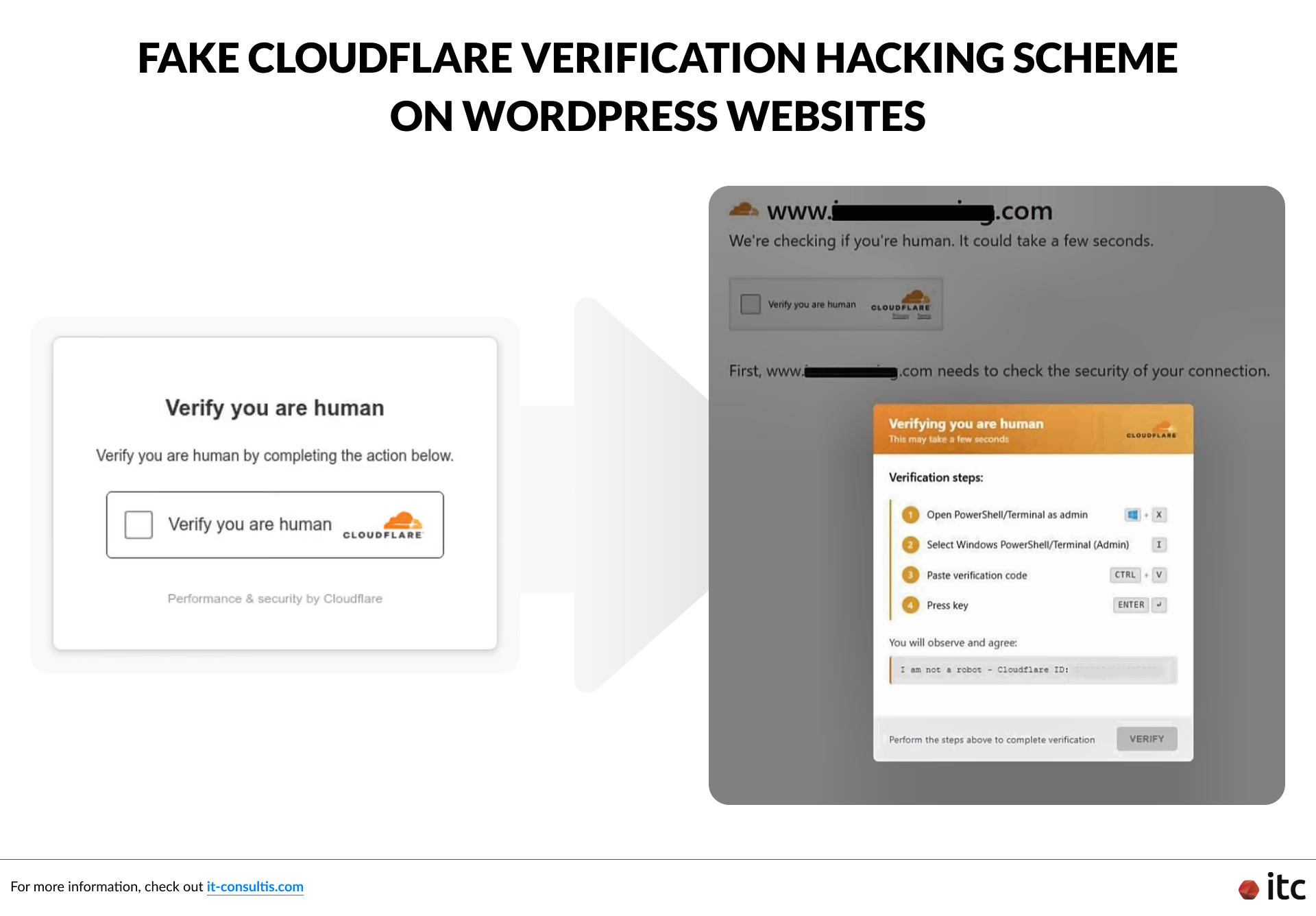
The visual treatment can look familiar enough to lower suspicion. But instead of running a legitimate browser check, the page instructs users to take unsafe action, such as opening a terminal, pasting a command, or downloading something they should never trust.
That is not legitimate Cloudflare behavior.
Once a website starts presenting attacker-controlled prompts to visitors, it is no longer dealing with routine maintenance. The site has become a delivery mechanism for risk.
Security researchers have documented similar patterns in broader WordPress compromise activity, including reporting from Rapid7 on WordPress compromise campaigns tied to stealer operations and Malwarebytes on fake verification pages used to spread malware.
Why This Attack Pattern Matters
A fake verification flow is more serious than a cosmetic defacement because it uses a trusted domain to influence visitor behavior.
That raises the cost of slow detection. Every extra hour can expose branded traffic, forms, and conversion journeys to malicious behavior the business did not approve.
What a Real Incident Revealed About WordPress Risk
The strongest lessons here come from a real incident, not from theory alone.
In the above case, the first external signal was hosting suspension triggered by detected malware activity. That immediately shifted the issue from website maintenance to containment.
Investigation then revealed several concrete problems:
- The environment was running PHP 5.6, an unsupported runtime with years of known exposure.
- Visitors were being redirected off-domain to attacker-controlled infrastructure, where the fake Cloudflare-style prompt was served.
- Multiple cloned and backdoored plugin and theme directories had been planted to resemble legitimate components.
- The spread of file drift and persistence risk was broad enough that confidence was too low for surgical cleanup.
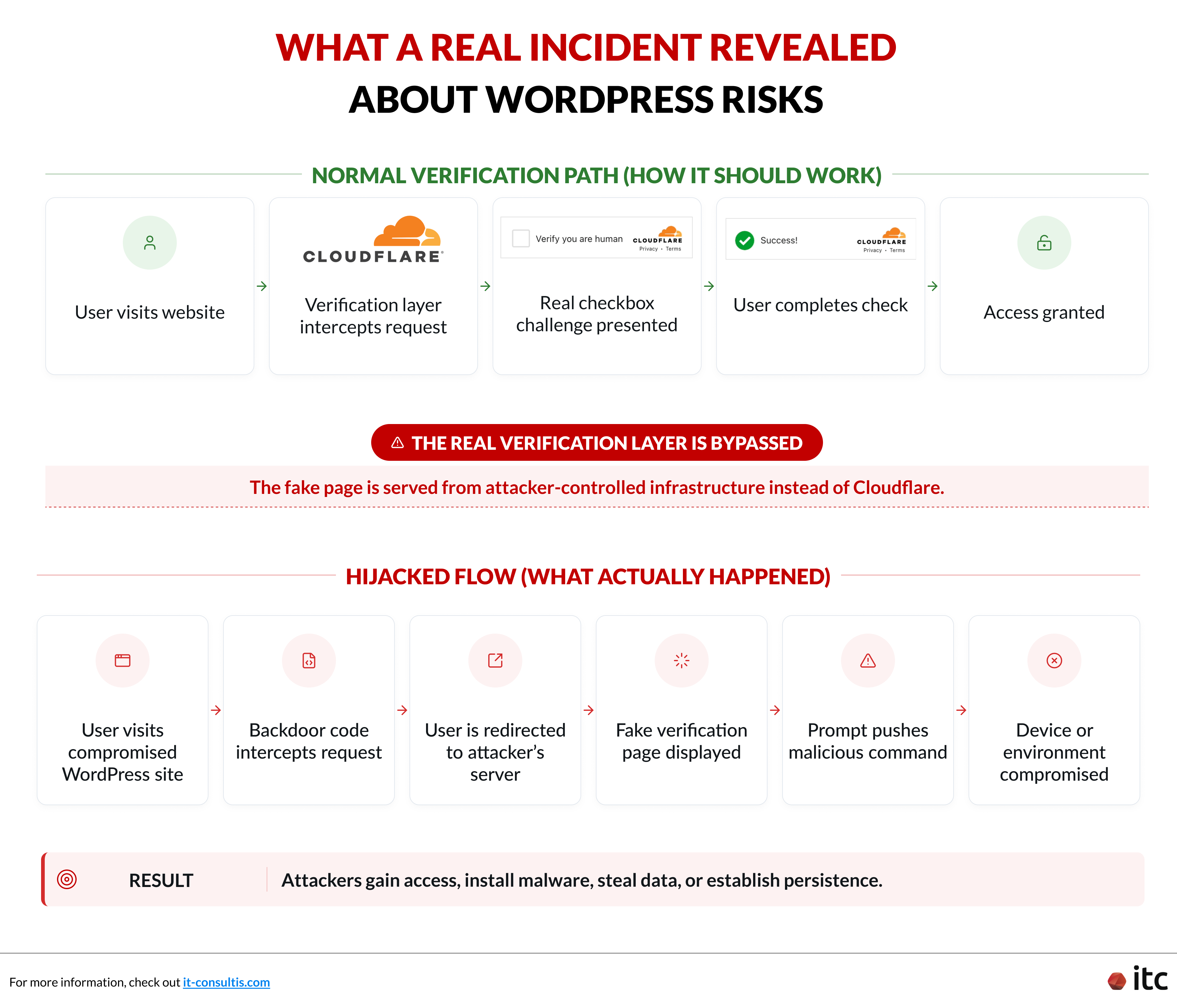
Those details matter because they show what avoidable compromise looks like in practice. Unsupported runtime plus weak component governance is not a minor hygiene issue. It is the foundation of preventable exposure.
That lesson is globally relevant. It becomes even more operationally sensitive when brands are coordinating website support across multiple regions.
For organizations operating across APAC, including Singapore and China, containment can slow down when infrastructure ownership, agency support, and relaunch approvals are split across markets.
How to Spot a Fake Verification Attack on WordPress
If you are searching for how to secure a WordPress website from hackers, the first practical step is learning how to recognize compromise before it widens.
1. Check for Visitor-Facing Anomalies
Look for fake verification prompts, suspicious redirects, browser warnings, unexpected downloads, or reports that the site suddenly behaves in ways the business did not authorize.
A legitimate verification layer does not ask visitors to run commands, open a terminal, or install anything. If a prompt does that, treat it as malicious until proven otherwise.
2. Check for Admin-Access Anomalies
Review admin accounts, password resets, role changes, and login behavior.
Unexplained administrator creation is a serious signal. So are dormant privileged accounts that suddenly become active, or changes nobody on the delivery team can tie back to an approved deployment or maintenance task.
3. Check for File Drift and Code Anomalies
Inspect for unexpected file changes, obfuscated PHP, injected scripts, unfamiliar directories, or executable logic appearing in places that should not contain it.
Without governed change history, teams lose the ability to distinguish maintenance from intrusion.
4. Check Whether Your Restore Position Is Actually Trustworthy
A backup only helps if the team can verify it predates the compromise and can be restored cleanly. If nobody can name the restore point they would trust today, the recovery posture is weaker than it looks.
5. Check External Warning Signals
Review Search Console notices, hosting alerts, WAF (web application firewall) events, uptime anomalies, and server logs.
The WordPress hardening guidance from WordPress.org is a useful baseline, but business-critical websites usually need stronger monitoring and clearer response ownership than baseline hardening alone provides.
How to Secure a WordPress Website From Hackers in Practice
The answer is not one plugin and not a rushed cleanup after the damage is already visible. In practice, how to secure a WordPress website from hackers starts with supported software, controlled change, reduced privilege, monitored behavior, and a recovery model the team has already tested.
The biggest WordPress failures are usually operational before they are technical.
Unsupported runtime, component sprawl, weak admin control, and untested recovery processes give attackers room to turn a normal website into a business-risk event.
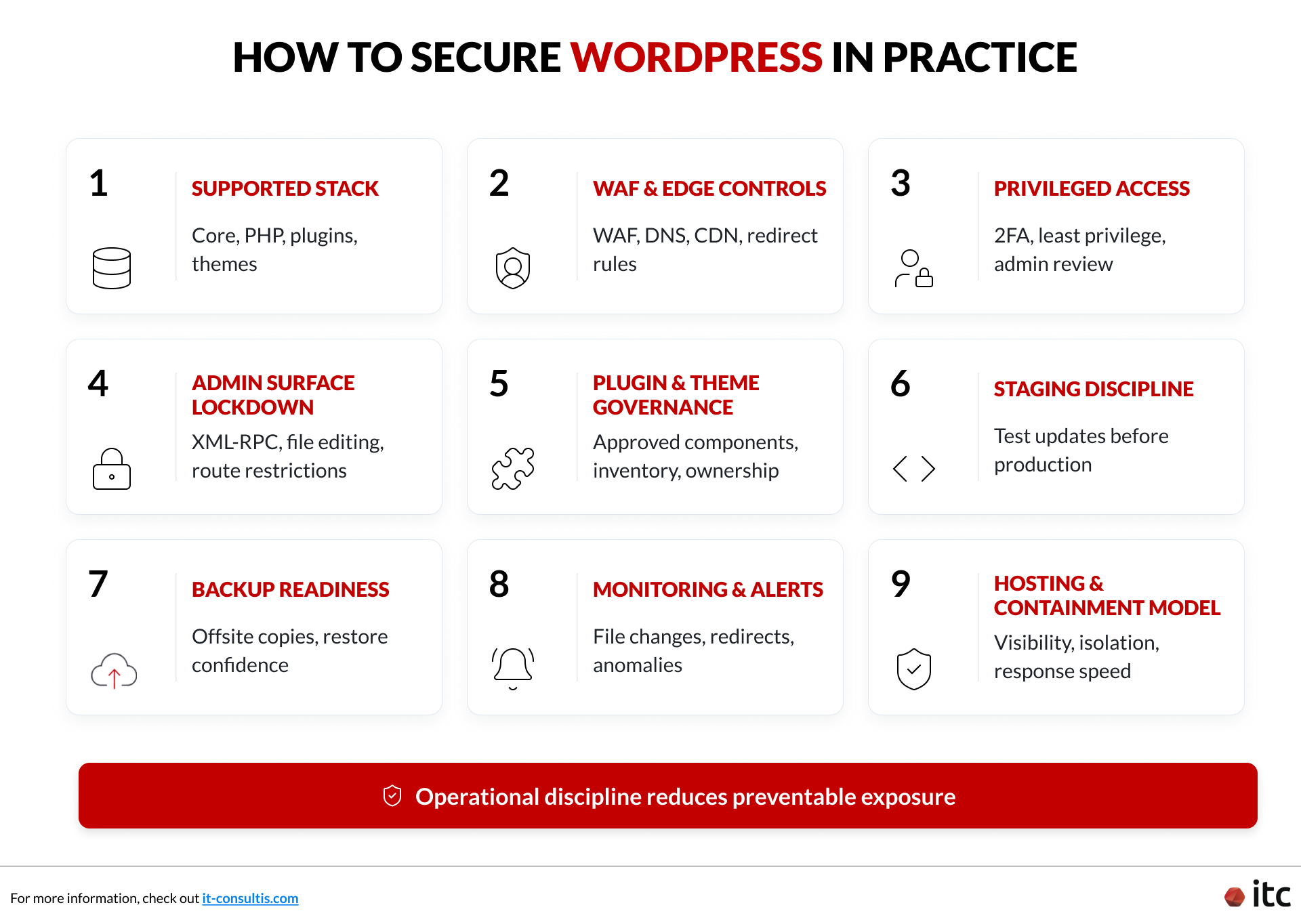
1. Keep the Runtime and Component Stack Fully Supported
Most WordPress compromises start with weak control over what is allowed to run in production.
That means:
- Keep WordPress core, plugins, themes, PHP, and server components on supported versions.
- Remove unsupported runtimes immediately. If a site still runs something like PHP 5.6, the business is carrying known exposure by choice.
- Remove unused plugins and themes instead of leaving them behind as tolerated leftovers.
- Require each production component to have a named owner, a business reason to exist, and a clear update path.
- Maintain an approved deployment trail so the team can explain what changed, when it changed, and why it changed.
If your team is reassessing whether its build and maintenance model is structurally strong enough, our guide to choosing the right WordPress development company is a useful reference point for evaluating governance, support maturity, and platform ownership.
2. Put a WAF and Edge Controls in front of the Site
A web application firewall is not a complete answer, but it is one of the highest-value controls for reducing opportunistic attack traffic before it reaches WordPress.
A practical operating checklist:
- Use a WAF at the edge to block known malicious patterns, bot traffic, and exploit attempts.
- Review DNS(website address system), CDN (content delivery network), and edge-provider settings as part of the security baseline rather than treating them as unrelated infrastructure trivia.
- Review WAF alerts regularly instead of assuming the tool is protective just because it is turned on.
- Tune rules for business-critical forms, login paths, and admin routes.
- Treat redirect behavior as a monitored control area, since attacker-controlled off-domain redirects can turn a compromise into visitor exposure very quickly.
The business value of the WAF is not only traffic blocking. It is earlier detection, faster containment, and better visibility into abnormal behavior before the incident widens.
3. Reduce Privileged Access and Review It on a Schedule
Access sprawl is often tolerated until incident response exposes how little ownership actually existed.
That includes:
- Enforce strong unique passwords and 2FA (two-factor authentication) on all privileged accounts.
- Limit administrator access to the smallest group that genuinely needs it.
- Review privileged access on a defined schedule instead of letting it expand by habit.
- Remove temporary, dormant, or weakly owned admin accounts.
- Restrict admin routes and use controlled VPN- or IP-based access patterns where appropriate.
- Make plugin installation rights, theme changes, and deployment permissions explicit instead of loosely shared.
4. Disable Unnecessary File Editing and Make an Explicit XML-RPC Decision
Many WordPress environments leave avoidable exposure in place because nobody ever made a conscious decision about it.
Two basic examples matter:
- Disable dashboard file editing in production so administrators cannot alter theme or plugin code from inside WordPress.
- Review XML-RPC (a legacy remote connection feature) deliberately. If the site does not need it for a specific use case, disable or tightly restrict it. If it does need it, monitor and protect it accordingly.
5. Enforce Plugin and Theme Governance
Plugin and theme sprawl is one of the fastest ways WordPress risk becomes hard to control.
To protect a WordPress site from hackers in a practical way, governance has to be strict enough to matter and simple enough to maintain:
- Approve plugins and themes against quality, update cadence, vendor reputation, and business necessity.
- Keep a documented inventory of active components and who owns them.
- Ban abandoned, duplicated, or low-trust components from production.
- Remove inactive themes and plugins entirely, not just deactivate them.
- Review whether custom code belongs in a governed codebase rather than buried inside production theme files.
For businesses that need stronger delivery and support discipline across global or regional estates, our WordPress development services for China, APAC, and global markets is a relevant companion resource on ownership structure, upgrade discipline, and post-launch support.
6. Use Staging Discipline for Every Meaningful Change
Security degrades quickly when production becomes the testing environment.
A stronger model is to:
- Test meaningful updates in staging before rollout.
- Validate plugin, theme, and PHP-version compatibility before production changes.
- Keep deployment responsibility clear so the team knows who approved the change.
- Record deployment history that investigators will later depend on if something goes wrong.
Without deployment discipline, teams lose the evidence chain they need to decide whether a change was authorized, accidental, or malicious.
7. Set a Backup Cadence That Supports Real Recovery
Backups matter only when they are recent enough, clean enough, and tested enough to support relaunch.
A practical baseline:
- Run backups on a schedule that matches business risk, typically at least daily for active marketing or lead-generation sites.
- Keep offsite copies so a compromised server does not also control the backups.
- Retain enough history to restore to a point before compromise, not just to yesterday.
- Test restoration regularly so the team knows the process works under pressure.
- Separate backup success reporting from actual restore confidence.
A backup strategy is weak if the team cannot name the restore point it would trust today.
8. Monitor for File Changes, Redirect Anomalies, and Suspicious Behavior
If prevention fails, detection speed becomes decisive.
Good monitoring should include:
- File-change monitoring on core paths and sensitive content areas.
- Alerts for unexpected redirect behavior.
- Visibility into login anomalies, new admin users, and permission changes.
- Uptime and behavior monitoring that catches not only outages but also malicious visitor journeys.
- Log access that allows technical teams to investigate quickly.
Monitor for behavior that changes business risk, not only uptime. That is one of the clearest ways to secure a WordPress website from hackers in practice.
9. Choose Hosting and Support Models That Improve Containment
Not all hosting setups support the same level of visibility, isolation, or incident coordination.
That matters everywhere, and it matters even more for organizations operating across multiple regions. A brand with stakeholders in Europe, APAC, Singapore, and China may find that response slows down when infrastructure ownership, website support, and relaunch approvals are fragmented.
For brands evaluating regional infrastructure trade-offs, hosting strategy becomes part of the security conversation as well, especially when performance, compliance, and ownership models affect containment speed across markets.
For a more detailed look at China-specific hosting considerations, see WordPress hosting in China.
When a Hacked WordPress Site Needs Cleanup — and When It Needs a Rebuild
A hacked WordPress site recovery plan should not begin with the cheapest option. It should begin with the path that leaves the least uncertainty behind.
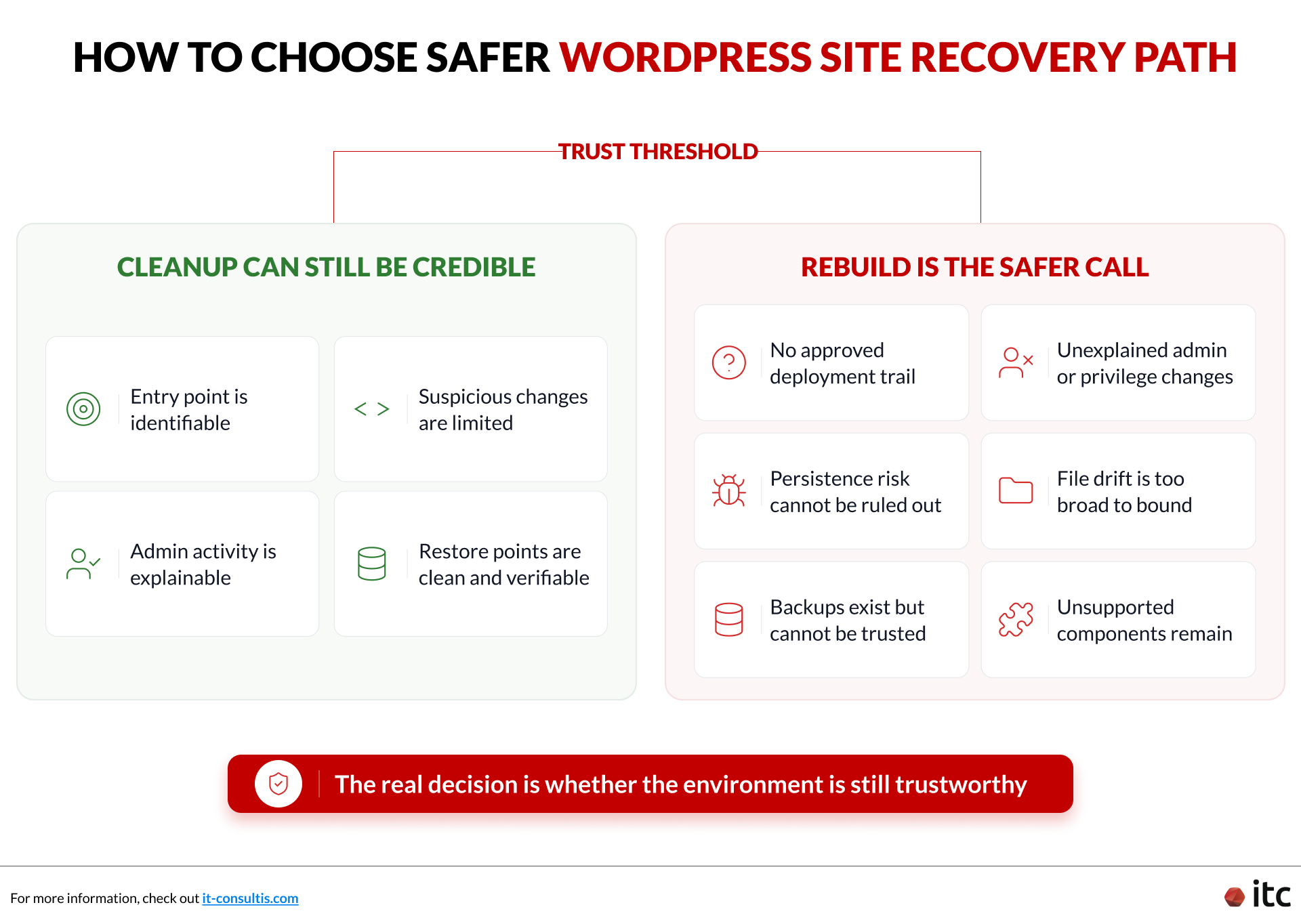
When Cleanup Can Still Be Credible
Targeted cleanup can be reasonable when the team can clearly bound the incident. That usually means:
- The initial entry point is identifiable.
- Suspicious changes are limited in scope.
- Admin activity is explainable.
- Changed files can be matched to known events or isolated malicious edits.
- Clean restore points are available and verifiable.
When Rebuild Is the Safer Call
Rebuild is usually the stronger decision when one or more of the following are true:
- There is no approved deployment trail for important file changes.
- Unexplained admin users or privilege changes have appeared.
- Persistence risk cannot be ruled out.
- File drift has spread far enough that the team cannot bound it confidently.
- Restore points exist, but nobody can verify they are clean.
- The production estate contains components nobody actively maintains or supports.
- Backdoored plugin or theme directories have been planted broadly enough that surgical cleanup would leave too much uncertainty.
The real decision is whether the environment is still trustworthy, not whether the visible damage looks manageable.
A Practical Recovery Sequence
- Contain fast. Restrict or take the website offline if visitors may be exposed.
- Preserve evidence and business assets. Capture what matters for investigation and controlled restoration.
- Decide cleanup versus rebuild based on confidence, not optimism. If scope is unclear, favor the path that removes uncertainty.
- Restore selectively. Bring back content, settings, and users only when they can be validated.
- Relaunch under heightened scrutiny. Reset credentials, validate key journeys, and monitor closely after go-live.
Conclusion: Detect Faster, Contain Earlier, Rebuild When Trust Is Gone
The standard is simple: detect faster, contain earlier, and rebuild when trust in the environment is gone.
A WordPress compromise becomes a business decision as soon as visitor trust, lead flow, and brand credibility are at risk. The real question is not whether the visible damage looks manageable. It is whether the team can still trust the environment enough to clean it safely, restore it confidently, and relaunch without hidden persistence.
If your site shows suspicious prompts, unexplained redirects, unfamiliar scripts, or admin activity nobody can verify, contain exposure immediately, investigate with discipline, and treat a rebuild as the rational call when recovery confidence has collapsed.
IT Consultis (ITC) helps teams assess suspicious WordPress behavior, contain exposure quickly, decide cleanup versus rebuild, and relaunch on a more secure footing.