When Salesforce becomes the core of your sales, service, and customer operations, the way people log in suddenly matters a lot.
For many enterprises, users and partners access dozens of cloud applications every day. Separate usernames and passwords for each system lead to password fatigue, weak security practices, and a heavy IT support load.
Implementing Single Sign-On can give users a seamless, one-click login experience while strengthening security and reducing IT overhead.
In this guide, we walk through the most common Salesforce Single Sign-On (SSO) setup use cases, who benefits most, the key advantages, and what you need to consider before getting started.
This applies both to global Salesforce orgs and to Salesforce on Alibaba Cloud deployments for enterprises operating in or expanding into China.
Executive Summary:
1. Salesforce Single Sign-On (SSO) lets enterprises use a central Identity Provider (IdP) with SAML 2.0/OAuth 2.0 so users access Salesforce (including Salesforce on Alibaba Cloud) with one secure corporate login instead of separate passwords.
2. It delivers stronger security and compliance, a smoother experience for employees/partners, and lower IT overhead by centralizing authentication, enforcing policies at the IdP, and simplifying user lifecycle management.
3. Salesforce SSO is especially valuable for medium–large, regulated enterprises and for brands operating in China that need Salesforce on Alibaba Cloud to fit into a consistent, compliant identity strategy.
4. A successful implementation depends on the right IdP choice, Salesforce admin access, and a clear identity and provisioning model, followed by a phased rollout.
5. Teams should anticipate identity mismatches, change management, and IdP dependency risks, apply security best practices, and can work with IT Consultis to design and maintain a robust Salesforce SSO architecture across global and China environments.
Table of contents
- What is Single Sign-On (SSO) in Salesforce?
- How Salesforce SSO Works
- Top Benefits of Adopting Salesforce Single Sign-On
- Who Is Salesforce SSO Most Suitable For?
- Key Prerequisites for Salesforce SSO Setup
- Getting Started: Practical Advice for First-Time Salesforce SSO Implementers
- Salesforce SSO’s Potential Challenges, Limitations, and How to Avoid Them
- Security and Compliance Best Practices for Salesforce SSO
- Single Sign-On for Salesforce Global vs Salesforce on Alibaba Cloud
What is Single Sign-On (SSO) in Salesforce?
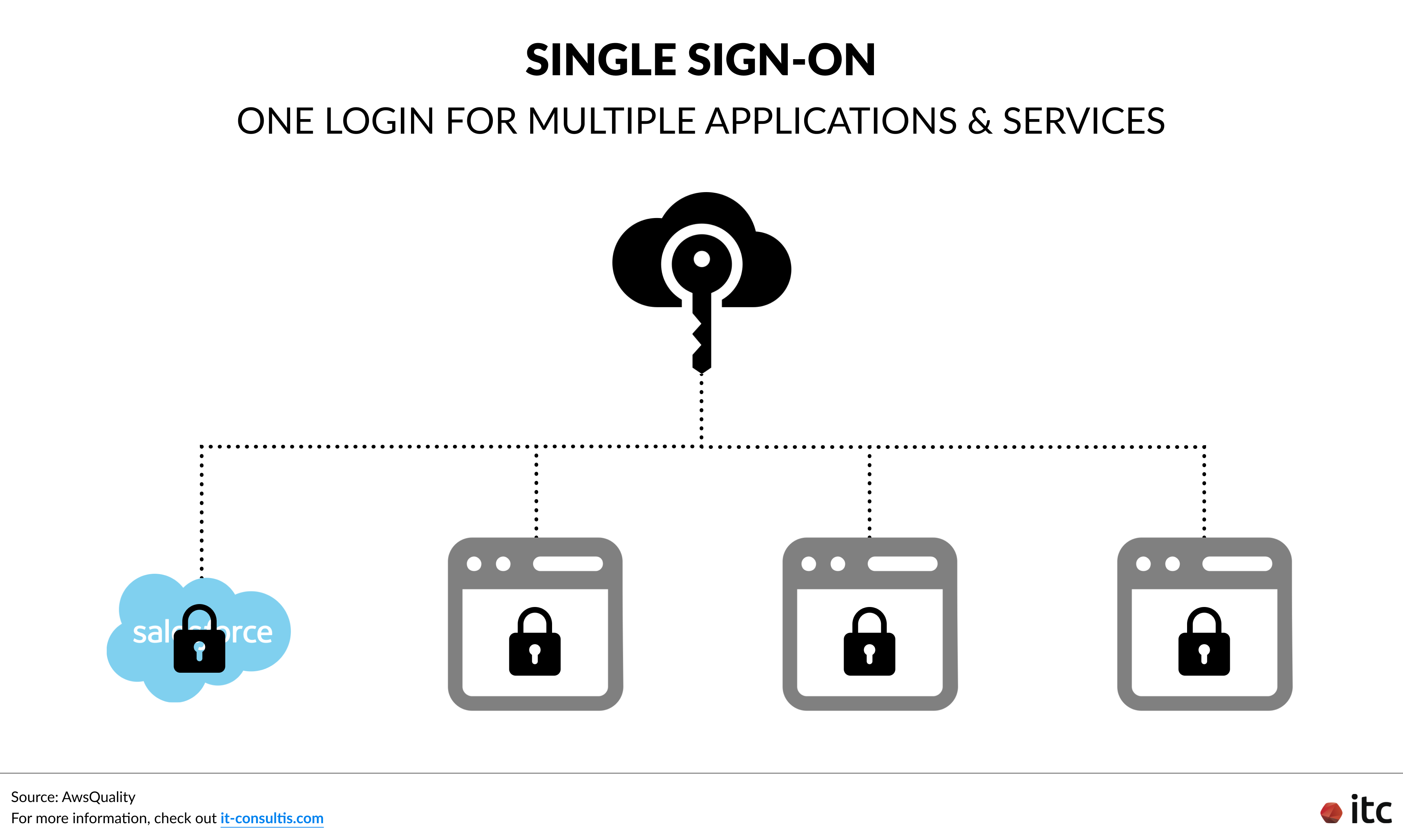
Salesforce Single Sign-On setup lets people use the same company login they already use for email or other systems to access Salesforce.
Instead of creating and remembering a separate Salesforce password, users sign in once to a central login system (often called an Identity Provider, or IdP). That system checks who they are and then tells Salesforce, “This person is trusted and allowed to log in.”
Salesforce (the service provider the user wants to access) then opens the right account for that person.
In simple terms: you log in once with your corporate credentials, and you can open Salesforce (and other connected apps) without typing your password again.
How Salesforce SSO Works
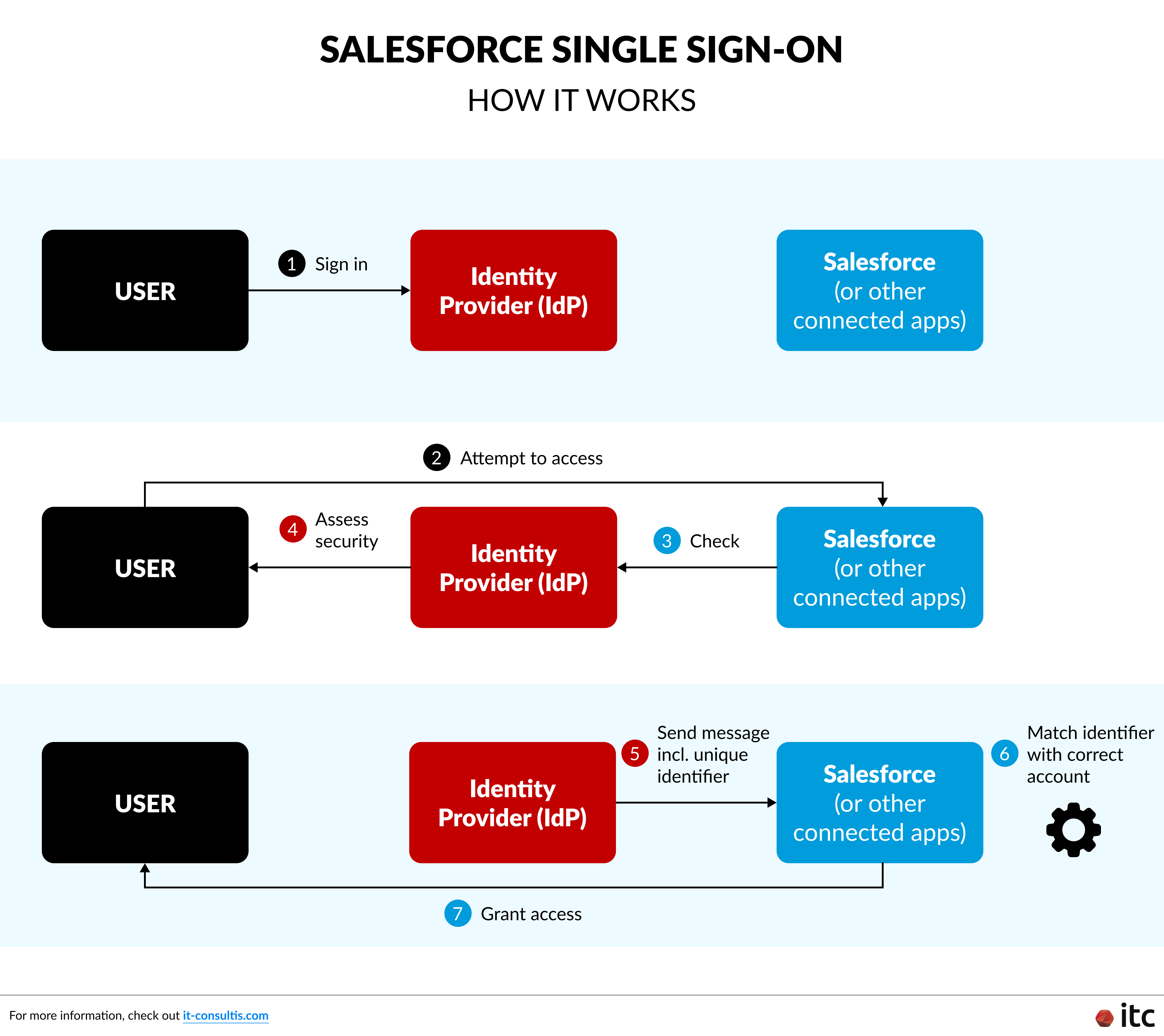
At a high level, a typical Salesforce SSO implementation looks like this:
- A user signs in to the company’s main login system (the Identity Provider, or IdP) with their usual corporate credentials and often multi-factor authentication (MFA).
- When they click the Salesforce app (from a portal, app launcher, or bookmark), Salesforce doesn’t ask for a separate password. Instead, it checks with the IdP in the background.
- The IdP makes sure everything looks safe — for example, it can check MFA, the device posture (whether the device looks trusted), the network/location, and other security conditions.
- If everything passes, the IdP sends a secure, digitally signed message to Salesforce — typically a SAML 2.0 assertion (a standard secure login message) or an OAuth 2.0 token (a secure access token confirming who the user is). This message includes a unique identifier for the user (such as email, username, or an employee ID mapped to fields like Federation ID or Username in Salesforce).
- Salesforce uses that identifier to match the user to the correct Salesforce account and grants access with the right permissions.
From the user’s perspective, they simply click Salesforce, and they’re in. All of the IdP / SAML / OAuth details happen automatically in the background.
Top Benefits of Adopting Salesforce Single Sign-On
1. Stronger Security & Centralized Compliance
For industries with strict regulatory requirements — such as financial services, healthcare, government, and public companies — centralizing authentication through Salesforce SSO is a key security control:
- Reduces password risks: Users no longer manage a separate Salesforce password, lowering the risk of weak, reused, or phished credentials.
- Centralized control: Password complexity, MFA, lockout rules, and session policies are all managed at the IdP.
- Streamlined auditing & compliance: A single, authoritative audit trail at the IdP makes it easier to demonstrate compliance with standards like SOX (financial reporting controls), GDPR (European data protection), HIPAA (healthcare data privacy), and internal security policies.
2. Better Experience for Employees, Partners, and Dealers
In medium to large organizations, employees and external partners already use a central identity system for email, VPN, intranet, and other tools. Extending SSO to Salesforce would enable:
- One-click access: Users log in once with their corporate credentials and open Salesforce (and other apps) without re-entering passwords.
- Less friction: No more forgotten Salesforce passwords or confusion between multiple logins.
- Smooth partner & dealer access: Trusted partners get secure, frictionless access to Salesforce-powered portals, aligned with existing contracts and partner levels.
3. Reduced IT Support Load & Easier User Management
Once the Salesforce SSO setup is in place, IT teams benefit from:
- Fewer password tickets: A significant drop in “forgot password” and login-related support cases.
- Simplified lifecycle management: When a user is disabled or updated in the IdP, their Salesforce access and permissions can be controlled in a single place.
- Aligned roles and policies: Role-based access and security policies stay consistent across Salesforce and other enterprise systems.
4. Operational Efficiency & Scalability
Salesforce Single Sign-On setup also supports long-term growth and transformation:
- Simplified app integration: Once SSO is established, onboarding new Salesforce orgs or connected apps becomes faster and more predictable.
- Supports growth and mergers & acquisitions (M&A): When acquiring new teams or companies, you can plug their identity source into the IdP and onboard them into Salesforce more smoothly, without redesigning access from scratch.
Who Is Salesforce SSO Most Suitable For?
Salesforce Single Sign-On implementation is especially valuable for:
- Medium to large enterprises (100+ employees): With hundreds of users and multiple systems, separate Salesforce passwords quickly become costly (password reset tickets), risky (weak or reused credentials), and operationally heavy (manual onboarding/offboarding). Centralizing login through SSO reduces this overhead and improves the organization’s security posture.
- Organizations with strict security & compliance requirements: Regulated sectors typically need centralized identity and access management, strong authentication controls (MFA, conditional access, IP restrictions), and detailed logging on who accessed what, and when. Salesforce SSO provides a unified point of control and logging to help enforce and demonstrate compliance.
For enterprises operating in or expanding into China, particularly those using or considering Salesforce on Alibaba Cloud to meet data residency and compliance requirements, SSO ensures that users in China enjoy the same secure and seamless login experience as global teams.
Enterprises in regulated sectors operating in the Chinese market should also consider using the WeCom message archive functionality to manage internal and external communications with leads, clients, and partners effectively.
Key Prerequisites for Salesforce SSO Setup
Before configuring anything in Salesforce (Service Provider — SP) or your Identity Provider (IdP), make sure these foundations are in place:
1. A Supported Identity Provider (IdP)
You’ll need an IdP that supports SAML 2.0 and/or OAuth 2.0, such as Okta, Microsoft Azure AD (Entra ID), Ping Identity, OneLogin, or ADFS, or an open‑source Identity and Access Management solution like Keycloak.
You should also have administrative access to this IdP so you can configure the Salesforce connection. For example, uploading certificates, updating metadata, and managing SSO settings.
2. Salesforce Administrator Access
You’ll need a System Administrator or equivalent profile with permissions like “Modify All Data” and “Customize Application” to configure SSO settings in Salesforce.
This includes generating the self‑signed certificate and metadata file, setting the Service Provider (SP) URL, defining the callback URL, and configuring the appropriate encryption and signing methods for your SSO connection.
3. Clear Identity and Provisioning Strategy
- User identifier: Decide which attribute (email, username, employee ID, etc.) will be used to match users between the IdP and Salesforce (for example, Federation ID or Username).
- Provisioning approach: Choose between pre-provisioned users (created in advance via admin or automation) or Just-In-Time (JIT) provisioning, where users are created in Salesforce upon their first SSO login. You can also use JIT to keep user information updated automatically.
- Fallback strategy: Plan how admins can still access Salesforce if the IdP is unavailable (for example, keeping the standard Salesforce login enabled for a limited set of admin users). This will also support the phased rollout approach described in the next section.
Getting Started: Practical Advice for First-Time Salesforce SSO Implementers
If you are considering SSO for Salesforce for the first time, once the key prerequisites are in place, you can move forward with a simple, phased approach:
- Start from security and compliance goals. Clarify why you want SSO: better security, simplified access, compliance, or all of the above.
- Confirm and standardize on your IdP setup. Validate that your chosen IdP (from the prerequisites above) supports SAML/OAuth, is properly configured, and integrates well with your existing systems — including any Salesforce on Alibaba Cloud orgs you run for the China market.
- Align with your identity & HR data model. Using the identity and provisioning strategy you defined earlier, confirm how users are identified, provisioned, and deprovisioned — and who owns each part of the lifecycle.
- Pilot with a focused group. Start with a limited set of users (for example, one department) to validate policies, performance, and user experience.
- Gradually roll out to more users and apps. Once Salesforce SSO is stable, extend the same IdP-based access to other critical business systems.
Ultimately, the strongest recommendation is simple: enable SSO and treat it as the standard way to access Salesforce, while keeping a controlled fallback login option for administrators.
Salesforce SSO’s Potential Challenges, Limitations, and How to Avoid Them
Technically, setting up Salesforce SSO is straightforward when you follow best practices, but there are a few areas to watch:
- Identity mismatches: If the identifier used in the SAML assertion doesn’t match a field in Salesforce, users won’t be able to log in. A clean identity mapping plan avoids this.
- Change management: Switching users from password-based login to SSO requires clear communication and training so people know what’s changing and when.
- Over-reliance on one system: If the IdP experiences downtime, users may be blocked. This is why a controlled fallback admin login in Salesforce is essential.
There are also some limitations and compatibility considerations to keep in mind:
- Salesforce supports modern SSO protocols like SAML 2.0 and OAuth 2.0.
- Legacy or niche applications that cannot speak these protocols may require additional integration work or alternative approaches.
- It is important to validate protocol support across your full application landscape when planning broader enterprise SSO, so Salesforce fits cleanly into the bigger picture.
It is also necessary to look beyond the initial setup. Even with the right protocols and integrations in place, you only get the full security benefit from Salesforce Single Sign-On when it’s backed by strong policies, session controls, and monitoring — which we cover in the next section.
Security and Compliance Best Practices for Salesforce SSO
To get the full security benefit from Salesforce SSO implementation:
1. Enforce Strong Policies at the IdP
- Use conditional access policies where available (e.g., block high-risk sign-ins, require trusted devices or networks).
2. Harden Salesforce Session Settings
Within Salesforce, configure session security to align with your corporate standards.
- Session timeouts: Set reasonable idle session limits (for example, 15–30 minutes) based on your risk appetite.
- Login IP ranges: Restrict access for sensitive profiles to corporate networks or VPNs.
- High-assurance actions: For access to particularly sensitive data, such as personally identifiable information (PII) or financial information, require re-authentication or additional checks.
3. Maintain Strong Auditing and Monitoring
- Regularly review authentication logs from the IdP.
- Monitor for unusual login patterns (impossible travel, abnormal times, repeated failures).
- Include Salesforce SSO in your periodic access reviews and compliance reporting.
Single Sign-On for Salesforce Global vs Salesforce on Alibaba Cloud
From an SSO perspective, there is no fundamental difference between Salesforce Global and Salesforce on Alibaba Cloud (Salesforce China).
- The same principles apply: an IdP authenticates the user, then sends an assertion to Salesforce.
- The configuration pattern — setting up SAML or OAuth, mapping identifiers, and testing — is essentially the same.
There may be environment-specific URLs or regional considerations, but the core Salesforce SSO implementation approach remains consistent.
When Salesforce Global and Salesforce on Alibaba Cloud Need to Work Together
In many enterprise environments, you do not just run one Salesforce org. For example:
- You need to meet China data residency and regulatory requirements, so China users work on Salesforce on Alibaba Cloud, while global teams stay on the Salesforce Global instance.
- You want a consistent Single Sign-on experience across both environments, even though they are hosted in different places.
- You are integrating Salesforce with WeCom or other China‑specific tools and want SSO to plug into that broader ecosystem.
In these cases, designing SSO with both Salesforce Global and Salesforce on Alibaba Cloud in mind helps you keep identity, access control, and user experience aligned across regions.
IT Consultis (ITC) is a certified Salesforce partner supporting brands with both global Salesforce rollouts and Salesforce on Alibaba Cloud deployments, especially for organizations operating in or expanding into China.
We help teams design, implement, and optimize Salesforce CRM in a way that balances security, compliance, and user experience — including Salesforce SSO implementation as part of a modern, centralized identity strategy.
From the initial architecture and integration design through to rollout and continuous improvement, we work with CRM, Sales, and IT stakeholders to make Salesforce adoption smoother and more secure.